> ## Documentation Index
> Fetch the complete documentation index at: https://docs.together-vietnam.com/llms.txt
> Use this file to discover all available pages before exploring further.
# Create an account
> Sign up for TV Community, verify your email, log in, and reset a forgotten password.
## Sign up
Open the TV Community app and click **Sign up**. Each number in the list matches a numbered field in the screenshot.
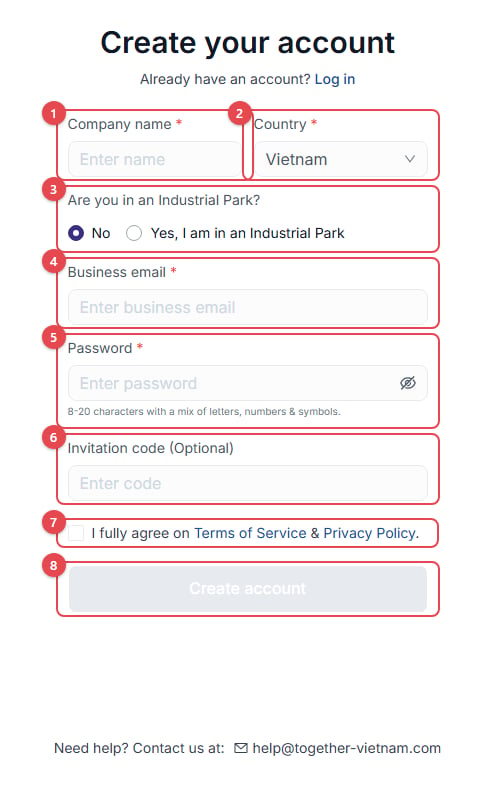 1. **Company name**: your company's name.
2. **Country**: where your company is registered.
3. **Are you in an Industrial Park?** If you choose *Yes*, also enter the park's name.
4. **Business email**: **use your company email**. Personal addresses such as Gmail are not accepted. Your email domain links you to your company.
5. **Password**: 8–20 characters with a mix of letters, numbers and symbols.
6. **Invitation code (Optional)**: enter the code if someone invited you.
7. Tick the box to accept the **Terms of Service & Privacy Policy**.
8. Click **Create account**.
Next, check your inbox and enter the **6-digit verification code**. If it hasn't arrived after a minute, check your spam folder or click **Resend code**.
Personal email addresses are rejected with *"Registration with a personal email address is not allowed."* Sign up with your company email.
## Log in
1. **Company name**: your company's name.
2. **Country**: where your company is registered.
3. **Are you in an Industrial Park?** If you choose *Yes*, also enter the park's name.
4. **Business email**: **use your company email**. Personal addresses such as Gmail are not accepted. Your email domain links you to your company.
5. **Password**: 8–20 characters with a mix of letters, numbers and symbols.
6. **Invitation code (Optional)**: enter the code if someone invited you.
7. Tick the box to accept the **Terms of Service & Privacy Policy**.
8. Click **Create account**.
Next, check your inbox and enter the **6-digit verification code**. If it hasn't arrived after a minute, check your spam folder or click **Resend code**.
Personal email addresses are rejected with *"Registration with a personal email address is not allowed."* Sign up with your company email.
## Log in
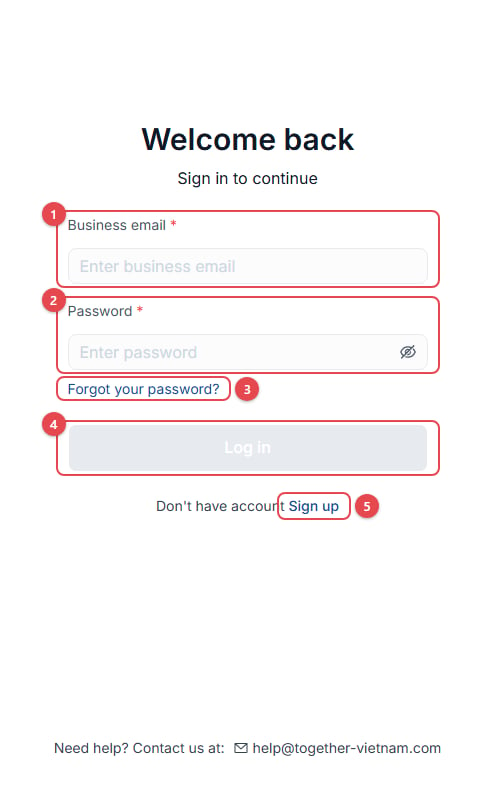 1. **Business email**
2. **Password**
3. **Forgot your password?**: reset your password (see below).
4. Click **Log in**.
5. **Sign up**: create a new account.
If you opened a shared link (for example, an event) before logging in, the app takes you back to it after you log in and finish onboarding.
## Forgot your password?
1. **Business email**
2. **Password**
3. **Forgot your password?**: reset your password (see below).
4. Click **Log in**.
5. **Sign up**: create a new account.
If you opened a shared link (for example, an event) before logging in, the app takes you back to it after you log in and finish onboarding.
## Forgot your password?
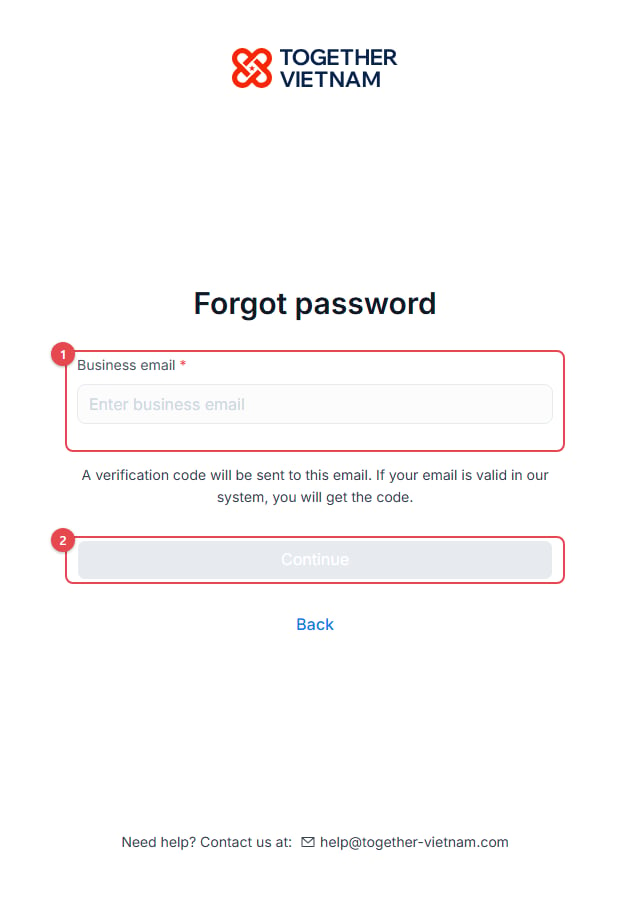 1. Enter your **Business email**.
2. Click **Continue**.
3. Enter the code we email you.
4. Set a **New password** and **Confirm password**.
## Sign up
Open the TV Community app and click **Sign up**. Each number in the list matches a numbered field in the screenshot.
1. **Company name**: your company's name.
2. **Country**: where your company is registered.
3. **Are you in an Industrial Park?** If you choose *Yes*, also enter the park's name.
4. **Business email**: **use your company email**. Personal addresses such as Gmail are not accepted. Your email domain links you to your company.
5. **Password**: 8–20 characters with a mix of letters, numbers and symbols.
6. **Invitation code (Optional)**: enter the code if someone invited you.
7. Tick the box to accept the **Terms of Service & Privacy Policy**.
8. Click **Create account**.
Next, check your inbox and enter the **6-digit verification code**. If it hasn't arrived after a minute, check your spam folder or click **Resend code**.
Personal email addresses are rejected with *"Registration with a personal email address is not allowed."* Sign up with your company email.
## Log in
1. **Business email**
2. **Password**
3. **Forgot your password?**: reset your password (see below).
4. Click **Log in**.
5. **Sign up**: create a new account.
If you opened a shared link (for example, an event) before logging in, the app takes you back to it after you log in and finish onboarding.
## Forgot your password?
1. Enter your **Business email**.
2. Click **Continue**.
3. Enter the code we email you.
4. Set a **New password** and **Confirm password**.
This documentation is built and hosted on [Mintlify](https://mintlify.com), a developer documentation platform.
1. Enter your **Business email**.
2. Click **Continue**.
3. Enter the code we email you.
4. Set a **New password** and **Confirm password**.
## Sign up
Open the TV Community app and click **Sign up**. Each number in the list matches a numbered field in the screenshot.
1. **Company name**: your company's name.
2. **Country**: where your company is registered.
3. **Are you in an Industrial Park?** If you choose *Yes*, also enter the park's name.
4. **Business email**: **use your company email**. Personal addresses such as Gmail are not accepted. Your email domain links you to your company.
5. **Password**: 8–20 characters with a mix of letters, numbers and symbols.
6. **Invitation code (Optional)**: enter the code if someone invited you.
7. Tick the box to accept the **Terms of Service & Privacy Policy**.
8. Click **Create account**.
Next, check your inbox and enter the **6-digit verification code**. If it hasn't arrived after a minute, check your spam folder or click **Resend code**.
Personal email addresses are rejected with *"Registration with a personal email address is not allowed."* Sign up with your company email.
## Log in
1. **Business email**
2. **Password**
3. **Forgot your password?**: reset your password (see below).
4. Click **Log in**.
5. **Sign up**: create a new account.
If you opened a shared link (for example, an event) before logging in, the app takes you back to it after you log in and finish onboarding.
## Forgot your password?
1. Enter your **Business email**.
2. Click **Continue**.
3. Enter the code we email you.
4. Set a **New password** and **Confirm password**.
This documentation is built and hosted on [Mintlify](https://mintlify.com), a developer documentation platform.